Writing / JavaScript & the browser · · 3 min read
Manipulating request and response with axios interceptors
Axios interceptors can be used to handle errors throughout the application and as today’s state of backend demands multiple microservices for different use cases/ features, These come at a cost for frontend applications to handle multiple api urls built by different developers. Along with this, frontend will also need to handle multiple types of authentications, errors and responses coming from these microservices and this lead to increasing complexity in project as well as increasing variability throughout. Error handling is always a part that no one likes to do but has to as stated in Murphy’s law
Anything that can go wrong will go wrong.
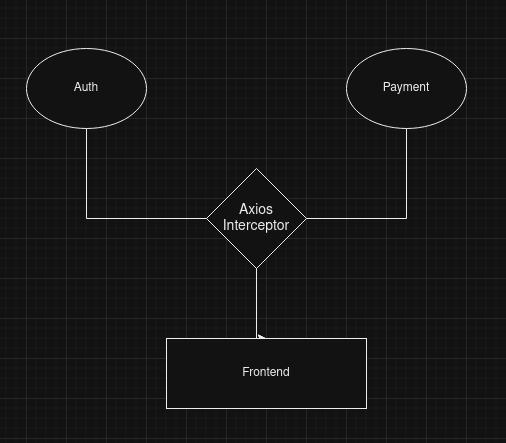
Authentication:
There are different methods for a backend application to authenticate a request and determine which user called the service. The most commonly used method is by a JWT token where the backend expects an encoded token. While using Oauth 2.0 Bearer tokens are the widely used tokens. It simply means attaching a Bearer string to the jwt token.
Error Handling:
There are different standards of errors being thrown. Different organizations use different formats. Also any third party api provider will have their fixed set of errors. To handle these many types of errors and convert them into a type that our frontend understands often becomes a cumbersome task.
Response modifications:
Frontend tends to use responses in a certain format and different microservices send data in different formats. Let’s say we need to show a list of tasks to be done by the user today. Some might send data in this format:
{
  "count":"20",
  "data": [...]
}
While others might send data like this:
{
  "results":[]
}
Retry certain requests:
There may be cases where one needs to retry a request whether it is after failure or in any other case. This one, I will be discussing in my next blog.
So handling state of request as well as responses coming from different microservices becomes a crucial part of every frontend application. There are multiple ways to do that:
-
Creating helpers for making api calls and then handling responses as well as errors
-
Extending the fetch method
-
Using axios interceptors
Today, we will be discussing about axios interceptors
Axios is the most popular library for making requests to web urls. As the name suggests, it is an interceptor. Axios provides a way to intercept the ongoing request as well as the incoming response to either modify it or reuse it.
- Let’s create a request interceptor to send authorization tokens in headers in each request while hitting the api of authentication microservice.
axios-interceptor-for-adding-token.js
// interceptor for setting token in every request of authenticationService
function createAxiosInstance(serviceBaseUrl){
  const axiosInstance = axios.create({
    baseURL: serviceBaseUrl
  })

  axiosInstance.interceptors.request.use(function (request) {
    // depending on service, add token to request if we are calling base url of auth service
    if(serviceBaseUrl === autheticationServiceBaseUrl){
      const token = "xxx.xxx.xxx"
      request.headers.Authorization = `Bearer ${token}`
    }
    return request;
  }, function (error) {
    return Promise.reject(error);
  });

  return axiosInstance
}
In the above code snippet, we have created a function that returns an axios instance that has a request interceptor attached to it for adding a Bearer token to request headers with Authorization key if the service is an authentication service.
- Let’s create an interceptor for modifying the response in the format we need.
axios-interceptor-for-response-modification.js
function createAxiosResponseConvertorInstance(serviceBaseUrl){
  const axiosInstance = axios.create({
    baseURL: serviceBaseUrl
  })

  const authenticatedUser = {
    id: "user-id",
    name: "sample-name",
    profilePic: "https://abc.com/profile-pic.jpg"
  }

  // let's say we always need a response with service name that produces the response
  axiosInstance.interceptors.response.use(function (response){
    if(serviceBaseUrl === autheticationServiceBaseUrl){
      const data = response.data
      if(Array.isArray(response.data)){
        response.data = {
          service: "authentication",
          items: data
        }
      }else{
        // assuming data to be an object
        response.data.service = "authentication"
      }
    }

    // let's say in payment service we always need a response which have current user details attached to it
    if(serviceBaseUrl === paymentServiceBaseUrl){
      // assuming data to be an object
      response.data.user = authenticatedUser
    }

    return response;
  }, function (error){
    return Promise.reject(error);
  })

  return axiosInstance
}
In the above code snippet, we have created a function that returns an axios instance that has a response interceptor attached to it for adding service name if we are calling authentication service else if we are calling payment service, adding a user object to response.
- Let’s create an interceptor for handling errors occuring in api call of different microservices
axios-interceptor-for-response-error-handling.js.js
class CustomError extends Error{
  constructor(message, code, service){
    super(message)
    this.statusCode = code;
    this.message = message;
    this.service = service;
  }
}

function createAxiosInstanceForErrorHandling(serviceBaseUrl) {
  const axiosInstance = axios.create({
    baseURL: serviceBaseUrl,
  });

  axiosInstance.interceptors.response.use(
    function (response) {
      return response;
    },
    function (error) {
      // if error is a type of axiosError
      if(error instanceof axios.AxiosError){
        // depending on service, handle error or throw custom error of your format
        if (serviceBaseUrl === autheticationServiceBaseUrl){
          throw new CustomError(error.code, error.message, "authentication")
        }else if(serviceBaseUrl === paymentServiceBaseUrl){
           throw new CustomError(error.code, error.message, "payment")
        }
      }
      return Promise.reject(error);
    },
  );

  return axiosInstance;
}
In the above code snippet, we have created a function that returns an axios instance that has a response interceptor attached to it for throwing custom errors if anything went wrong.
It can be enhanced to handle errors more gracefully and manage state in frontend applications.
Thanks for reading the blog. If you like it, don’t forget to hit the clap icon. If you need any help leave a comment below.
Written by Dikshant Rajput, AI and full-stack engineer. Also published on Medium. Questions? Ask my AI version or get in touch.