Writing / Node.js, Express & GraphQL · · 2 min read
Sequelize with expressjs and postgres
In my previous blogs, I discussed setting up expressjs, middleware, and jwt token authentication. In this blog, I will be writing about connecting the express application with DB(Postgres) using the sequelize ORM library. Let’s get started.
Prerequisites:
-
Postgres DB (download it from here)
-
expressjs application
-
sequelize ORM package
I won’t be covering the setting up of express application as I have covered it in the past. I assume you have your express application configured. Let’s download the sequelize and node Postgres packages
npm install pg
npm install sequelize
Start the downloaded Postgres server and open up a command prompt and run
postgres --version
Note: If you want to access Postgres in the command line write this command:
psql or psql -U postgres
This will confirm that Postgres is installed on your system and remember the password set while installing the Postgres server. This will be used to connect with the DB.
Create a file and name it db.js or anything you want.
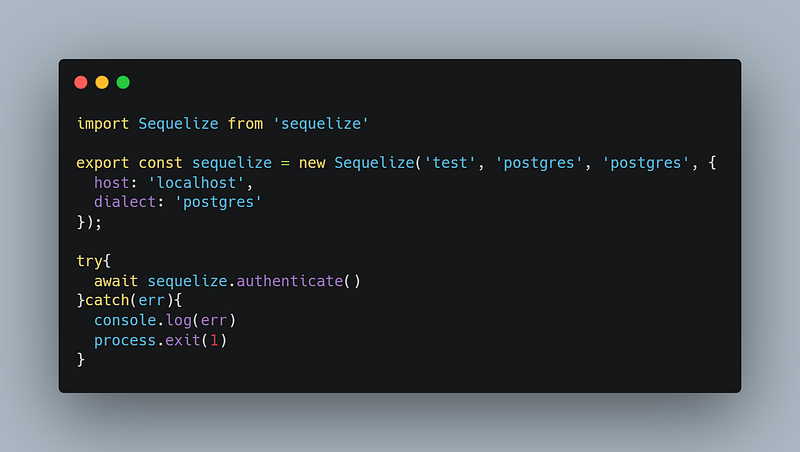
The Sequelize class expects 4 parameters
-
DB name
-
DB username
-
DB password
-
Object with DB host and dialect
NOTE: dialect is the DB name like Postgres, MySQL, sequelite, etc.
sequelize.authenticate() will check whether the connection is made successfully or not.
Let’s create a user model and apply crud operations on it and expose it using API.
Create a models directory and a User.js file in it
User.js
import { DataTypes, Model } from "sequelize";
import { sequelize } from "../db.js";

export default class User extends Model{}

User.init({
  id:{
    type:DataTypes.BIGINT,
    allowNull: false,
    primaryKey:true,
    autoIncrement:true
  },
  fname:{
    type:DataTypes.STRING,
    allowNull:false
  },
  lname:{
    type:DataTypes.STRING,
    allowNull:true
  },
  email:{
    type:DataTypes.STRING,
    allowNull:false
  },
  password:{
    type:DataTypes.STRING,
    allowNull:false
  },
  createdAt:{
    type:DataTypes.DATE,
    allowNull:false,
    defaultValue: DataTypes.NOW
  },
  updatedAt:{
    type:DataTypes.DATE,
    allowNull:false,
    defaultValue: DataTypes.NOW
  }
},{
  sequelize:sequelize,
  timestamps:true,
  tableName:'users',
  modelName:'User'
})
Create a routes directory and a user.js file in it.
user.js
import { Router } from "express";
import User from "../models/User.js";

export const userRouter = Router()

userRouter.get("/",async (req,res)=>{
  const users = await User.findAll()
  return res.json({data:{users}})
})
The above function will get all the users from db using the findAll() method.
user.js
userRouter.get("/:id",async (req,res)=>{
  const {id} = req.params
  const user = await User.findOne({where:{id}})
  return res.json({data:{user}})
})
This will fetch a single user based on the id given.
user.js
userRouter.post("/",async (req,res)=>{
  const {fname, lname, email, password} = req.body
  try{
    const user = await User.create({fname,lname,email,password})
    return res.json({data:{user}})
  }catch(err){
    if(err.name === 'SequelizeValidationError'){
      return res.json({message:err.errors[0].message})
    }
    console.log(err)
    return res.json(err)
  }
})
This will create a new user.
user.js
userRouter.put("/",async (req,res)=>{
  const {id, fname, lname, email, password} = req.body
  try{
    const isUpdated = await User.update({fname,lname,email,password},{
      where:{
        id
      }
    })
    if(isUpdated[0]) return res.json({data:{message:true}})
  }catch(err){
    return res.json({err})
  }
  return res.json({data:{message:false}})
})
This will update the user based on the id given.
user.js
userRouter.delete("/",async (req,res)=>{
  const {id} = req.body
  try{
    const isDeleted = await User.destroy({
      where: {
        id
      }
    })
    if(isDeleted) return res.json({data:{message:true}})
  }catch(err){
    return res.json({err})
  }
  return res.json({data:{message:false}})
})
This will delete the user based on the id given.
Check the database after performing all the operations. The complete file will look something like this:
user.js
import { Router } from "express";
import User from "../models/User.js";

export const userRouter = Router()

userRouter.get("/",async (req,res)=>{
  const users = await User.findAll()
  return res.json({data:{users}})
})

userRouter.get("/:id",async (req,res)=>{
  const {id} = req.params
  const user = await User.findOne({where:{id}})
  return res.json({data:{user}})
})

userRouter.post("/",async (req,res)=>{
  const {fname, lname, email, password} = req.body
  try{
    const user = await User.create({fname,lname,email,password})
    return res.json({data:{user}})
  }catch(err){
    if(err.name === 'SequelizeValidationError'){
      return res.json({message:err.errors[0].message})
    }
    console.log(err)
    return res.json(err)
  }
})

userRouter.put("/",async (req,res)=>{
  const {id, fname, lname, email, password} = req.body
  try{
    const isUpdated = await User.update({fname,lname,email,password},{
      where:{
        id
      }
    })
    if(isUpdated[0]) return res.json({data:{message:true}})
  }catch(err){
    return res.json({err})
  }
  return res.json({data:{message:false}})
})

userRouter.delete("/",async (req,res)=>{
  const {id} = req.body
  try{
    const isDeleted = await User.destroy({
      where: {
        id
      }
    })
    if(isDeleted) return res.json({data:{message:true}})
  }catch(err){
    return res.json({err})
  }
  return res.json({data:{message:false}})
})
The server.js file will look something like this:
server.js
import Express from 'express'
import cors from 'cors'
import bodyParser from 'body-parser'
import { authMiddleware } from './middleware.js'
import jwt from 'jsonwebtoken'
import { userRouter } from './router/user.js'

const app = Express()

app.use(cors())
app.use(bodyParser.json())

app.get("/",(_,res)=>{
  return res.json({hello:"HI"})
})

app.get("/hello",(_,res)=>{
  return res.json({hello:"world"})
})

app.post("/login",(req,res)=>{
  const email = req.body.email
  const password = req.body.password

  if(!email || !password) return res.status(419).json({message:"Improper Data provided"})
  if(email !== "admin@gmail.com" || password !== "password") return res.status(401).json({message:"Invalid credentials"})

  const payload = {user:{id: 1, name: 'user1'}}
  let token = ''
  try{
    token = jwt.sign(payload,'secret-string',{expiresIn:60 * 60}) //get it from .env file in prod
  }catch(err){
    return res.status(500).json({message:err.message})
  }
  return res.json({token})
})

app.get("/protected",authMiddleware,(req,res)=>{
  const user = req.auth.user
  return res.json({message:"Hello from protected route",user})
})

app.use('/users',userRouter)

const port = 3000

app.listen(port,()=>{
  console.log(`Server running on port http://localhost:${port}`)
})
Hit command npm start on the terminal and go to http://localhost:3000/users in postman and switch between the methods and test. That’s it.
I hope you like the blog and if you do, hit the clap icon and do follow me for more such blogs.
Drink water. Keep smiling…
Written by Dikshant Rajput, AI and full-stack engineer. Also published on Medium. Questions? Ask my AI version or get in touch.