Writing / JavaScript & the browser · · 2 min read
Mastering Firestore Converters with TypeScript
In this blog, I will cover how we can use Firestore converters and add types to our documents without relying on the as keyword. Let's begin

What is a Firestore converter?
As specified in their official docs, a converter allows you to specify generic type arguments when storing and retrieving objects from Firestore. In short, converters function as interceptors or middlewares between your code and Firestore.
So basically, a converter is just a function returning an object with two keys: toFirestore and fromFirestore. The value of these keys are themselves functions that help manipulate types or data that we post to Firestore or retrieve from it. Let’s delve into how they work.
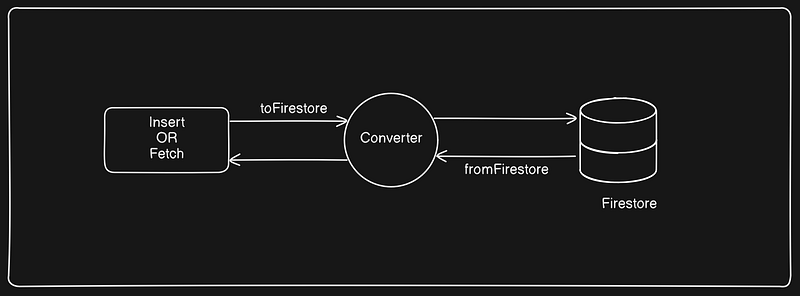
Let me illustrate this with an example.
Suppose we have a Firestore collection named “post.” Now, whenever we insert a new document into the “post” collection, we want it to automatically have a createdAt timestamp field. Additionally, when we fetch any document from this collection, we want the document's ID to be included in the data() method of the document. Furthermore, we want the createdAt field to be converted into a Date object automatically, eliminating the need for explicit type casting elsewhere in our code.
To achieve this, we can utilize the following code snippet:
import {
  serverTimestamp,
} from "firebase/firestore";

const postFirestoreConverter = {
    toFirestore: (item) => {
      return {
        ...item,
        createdAt: serverTimestamp()
      };
    },
    fromFirestore: (snapshot, options) => {
      const data = snapshot.data(options);
      return {
        ...data,
        id: snapshot.id,
        createdAt: data.createdAt?.toDate()
      };
    }
  };ja
In the provided code, on line 6, the toFirestore property of the object is assigned a function that takes an item as input and returns an object with the createdAt field added to it.
On line 12, the fromFirestore property of the object is assigned a function that takes a document snapshot's data as input and adds the id field to it. Additionally, it typecasts the createdAt field into a Date object.
Now let’s try to create a generic document Firestore converter that can be used for any type with the above functionality with typescript:
import {
  serverTimestamp,
  type QueryDocumentSnapshot,
  type SnapshotOptions,
  Timestamp
} from "firebase/firestore";
import type { IPost } from "./x";
import type { IUser } from "./x";

const createFirestoreConverter = <T extends { createdAt: Timestamp }>() => {
  return {
    toFirestore: (item: T) => {
      return {
        ...item,
        createdAt: serverTimestamp()
      };
    },
    fromFirestore: (snapshot: QueryDocumentSnapshot<T>, options?: SnapshotOptions) => {
      const data = snapshot.data(options);
      return {
        ...data,
        id: snapshot.id,
        createdAt: data.createdAt?.toDate()
      };
    }
  };
};

export const userFirestoreConverter = createFirestoreConverter<IUser>();
export const postFirestoreConverter = createFirestoreConverter<IPost>();
In the provided code snippet, a utility function has been crafted to generate Firestore converters for various document types. Let’s dissect the code:
The helper function employs a generic type constraint, extending an interface featuring a createdAt key. The resultant object from this function encapsulates two keys as elaborated earlier, augmented with typed implementations.
How to use them?
const docRef = doc(firebaseDb, "users", "docId").withConverter(userFirestoreConverter);
const user = await getDoc(docRef);
const data = user.data();
Firebase provide a method named withConverter to add a converter with the document. In the above code we are getting a user document. The type of data would be of IUser.
await addDoc(
  collection(firebaseDb, "users").withConverter(userFirestoreConverter),
  payload
);
In the provided code snippet, when creating a user document using userFirestoreConverter, the converter automatically adds the createdAt field with the server timestamp to the Firestore document. Therefore, there's no need to include createdAt in the payload that is passed to Firestore.
Thanks for reading the blog. If you found it helpful, don’t hesitate to show your appreciation by clicking the clap icon. For any further assistance or questions, feel free to leave a comment below. Your feedback is highly valued!
Written by Dikshant Rajput, AI and full-stack engineer. Also published on Medium. Questions? Ask my AI version or get in touch.